Expired domains sound like a shortcut: you buy something with existing backlinks, skip the authority-building phase, and get ahead faster.
The reality is messier because most expired domains are junk.
They’ve been cycled through link farms, redirected arbitrarily, or abandoned after a Google penalty quietly wiped out whatever value they had. The backlinks are still there in the data, but, sadly, the value isn’t.
Ahrefs doesn’t solve this problem automatically.
It gives you link data, referring domain counts, anchor text distributions, and historical trends, but it doesn’t tell you whether a domain is worth buying.
That judgment still requires a process, and this guide is that process.
If you want a repeatable way to find expired domains that are actually worth acquiring, this is where to start.
TL;DR
- An expired domain is only valuable when three things align: the backlinks are live and contextual, the topic matches your intended use, and the history is clean.
- Ahrefs is best used as a validation and prioritization engine. It tells you whether a domain is worth buying, but not where to find every candidate.
- This guide covers five Ahrefs-based methods for finding and evaluating expired domains: competitor backlinks, broken link analysis, Content Explorer, Link Intersect, and Lost Backlinks reports.
- The metrics that matter most are anchor text distribution, link type, referring domain trends over time, and topic alignment.
- Before buying anything, run a Wayback Machine check. No Ahrefs report replaces a manual history review.
- Score every candidate across five factors (relevance, link quality, history, brand risk, price) before making a decision.
- Deployment matters as much as acquisition. A clean domain misused is still a wasted investment.
What Is an Expired Domain, and Which Types Are Actually Worth Your Time?
Expired domains are previously registered domain names that aren’t renewed, which means someone else can purchase them.
If these domains were good, they can help you gain more traffic and build backlinks faster. Some SEOs also use expired domains to create Private Blog Networks (PBNs).
The Four Types of Expired Domains
- Dropped domains are fully released back into the registrar pool after the owner stopped renewing and the grace period expired. You can generally find them at standard registration cost, but the window to catch quality ones is narrow and competitive. Most drop-catching services exist precisely because good dropped domains disappear within minutes.
- Pending delete domains are in the final stage before being dropped. They’ve cleared the redemption period and are about to become publicly available. You can monitor these through registrar tools and drop-catching services, but availability is never guaranteed.
- Auction and closeout domains are listed on platforms like GoDaddy Auctions, Namecheap Marketplace, or Sedo. These tend to be more expensive, but they offer more time to evaluate before committing. Auction domains are where most serious expired domain acquisitions happen.
- Recently expired but still renewable domains can sometimes still be reclaimed by the original owner. If you’re sourcing from lists, verify actual drop status before doing any serious evaluation because some tools surface domains that aren’t truly available yet.
Match Expired Domain Type to Your Intent
The right type of domain depends entirely on what you’re trying to build:
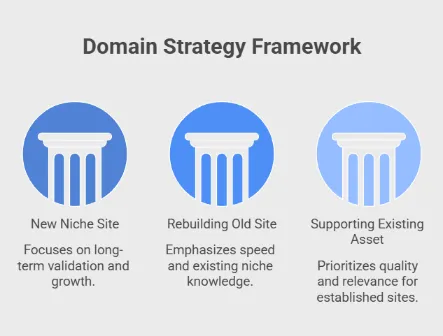
- New niche site from scratch: Auction and closeout domains give you more time to validate properly, which matters when you’re building something long-term.
- Rebuilding an old site: Dropped or pending delete domains can work if you’re moving fast and already know the niche well enough to validate quickly.
- Supporting an existing asset: Here, quality and relevance matter most. Auction domains are usually the safer route because vetting time is less compressed.
What Actually Determines Expired Domain Value
Age is not the point. A ten-year-old domain with a manipulated link profile is worth less than a four-year-old domain with ten clean, contextual backlinks from real industry sites.
The three things that actually matter are:
- Whether the backlinks are still live: Links that have been removed or are pointing to dead pages don’t pass SEO value.
- Whether the links are contextually relevant: A domain about accounting software that accumulated links from finance blogs has transferable authority; one that bought links from a private blog network does not.
- Whether the topic is aligned with your intended use: This is non-negotiable, regardless of how strong the metrics look.
Remember: Topic mismatches can actively signal manipulation to Google when you redirect or rebuild, which is a worse outcome than starting fresh.
What Can Ahrefs Actually Tell You About an Expired Domain And What It Can’t?
This is the section most guides skip, and it’s why so many people misuse the tool. Ahrefs is exceptional at what it does… but what it does is narrower than most people assume.
Getting this mental model right before you run a single report will save you from the most expensive mistakes in expired domain acquisition.
What Ahrefs Actually Gives You
- Domain rating: It can show you whether the domain still carries measurable authority. In Ahrefs, you can see Domain Rating, though another commonly referenced indicator is Moz DA (measures Domain Authority).
- Referring domain quality. You can see which domains are linking to a candidate, what their own authority looks like, and whether they’re the kind of sites that would link naturally to legitimate content. This is the single most useful signal Ahrefs provides, especially because links are still a top-3 Google ranking factor. If you're using Ahrefs alternatives like Majestic, you can see Trust Flow (Maj TF), which measures your backlink profile's quality. Pair Maj TF with Majestic CitationFlow (Maj CF) to get a better understanding of a domain's quality.
- Link placement signals. Ahrefs lets you see whether links are coming from within body content, sitewide footers, sidebars, or author bios. Contextual, in-content links are what you’re looking for. Sitewide or footer links from the same domain inflate referring domain counts without adding proportional value.
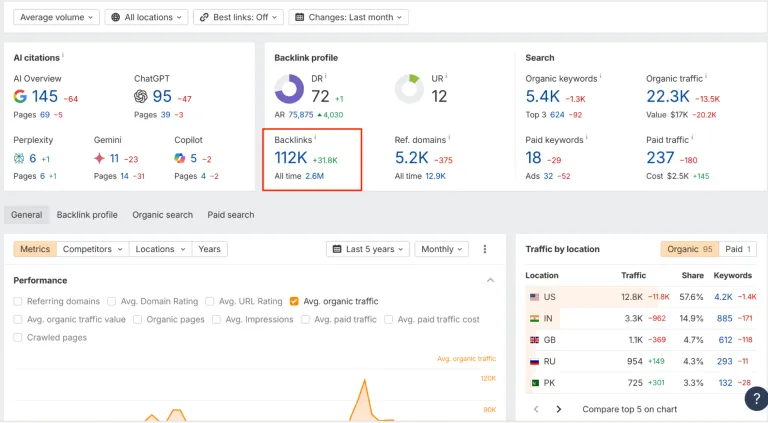
- Historical trends. The referring domains graph over time is one of the most underused features for expired domain evaluation. A domain that grew links steadily over several years looks very different from one that spiked in a short window and then flatlined. In fact, the latter is almost always a manipulation fingerprint. Here’s a good example of it:
What Ahrefs Cannot Do
- It cannot confirm drop status. Ahrefs indexes link data, but not registrar availability. A domain can show strong metrics in Ahrefs and still be unavailable, already purchased, or still renewable by its original owner. Always verify availability separately.
- It cannot replace a manual history review. Ahrefs has no record of what content the domain previously hosted, whether it was hacked, whether it was used for spam, or whether it pivoted topics multiple times. You can find that information lives in the Wayback Machine, but not in any link database.
- It cannot guarantee safety. Strong metrics don’t equal a clean domain. A well-executed private blog network can produce referring domain profiles that look legitimate inside Ahrefs until you examine the actual linking sites manually. The tool surfaces data, though interpretation is still your job.
Before You Start: What to Set Up Inside Ahrefs
Jumping straight into reports without a clear brief is how you end up with a sprawling list of candidates that don’t serve any coherent purpose. Ten minutes of preparation before you open a single Ahrefs tool will make every subsequent step faster, cleaner, and easier to act on.
Define Your Niche Before You Touch Any Report
This sounds obvious, but gets skipped constantly.
For example, “marketing” is not a niche definition. “B2B SaaS content marketing for companies under 50 employees” is.
The tighter your definition, the easier it is to make fast, confident relevance calls when you’re looking at dozens of candidates. Vague niche definitions lead to domains that technically overlap with your topic but don’t actually serve your audience or link profile goals.
So, write it down before you start. One or two sentences, specific enough that someone unfamiliar with your site could use it to filter candidates for you.
Identify Five to Ten Real Competitors
Don’t focus on the biggest websites in your space. We mean websites that are actually competing for the same keywords, at roughly the same level, with a content strategy similar to yours.
These are the sites you’ll use in Methods 1, 2, and 4. The quality of your competitor selection directly determines the quality of the expired domain candidates you surface.
- Stable, consistently-ranking competitors with a genuine backlink profile will point you toward domains that linked naturally to relevant content.
- Weak or low-quality competitors will surface weak candidates.
Our advice: Spend genuine time on this list. Five solid competitors will outperform ten mediocre ones every time.
Set Conservative Baseline Metrics
Metrics are filters, so their job is basically to cut obvious waste from your candidate list.
A reasonable starting baseline for most intermediate use cases:
- Referring domains: 20-30 minimum from unique, non-overlapping sources
- DR: useful only as a rough triage filter, but we don’t encourage you to use it as a quality signal on its own
- No single referring domain accounting for more than 30-40% of the total link profile
Keep these thresholds conservative.
- Setting them too high means you’ll discard legitimate candidates with lean but clean profiles.
- Setting them too low means your shortlist becomes unmanageable.
Remember: You can always adjust after your first round of evaluation once you have a feel for what the candidate pool looks like in your niche.
Establish Brand and Trademark Rules Upfront
If a domain name contains a brand term, a product name, or anything that could create confusion with an existing business, it’s a liability regardless of its link profile.
Trademark conflicts are expensive, and Google has historically been sensitive to domain names that look like they’re trying to piggyback on brand equity.
Decide before you start: are you open to partial brand matches, or does any brand association disqualify a candidate immediately? Having a rule in place means you don’t waste evaluation time on domains you’d never actually use.
Prepare a Tracking Sheet
You will lose candidates without one. Expired domain evaluation involves moving between Ahrefs, the Wayback Machine, registrar availability checkers, and your own judgment.
And you’ll do all this across multiple candidates, usually over several days.
Without a consistent place to record what you’ve checked and what you found, you’ll either duplicate work or make decisions based on incomplete notes.
Pro tip: A simple sheet with columns for domain name, source method, referring domains, anchor profile notes, Wayback status, topic match score, and a final go/no-go is enough.
Method 1. How to Find Expired Domains Through Competitor Backlinks
Competitor backlink analysis is the most reliable starting point for expired domain prospecting. The logic is straightforward: if a domain once earned links from the same sites that link to your competitors, it was operating in your space, for your audience, at a level that real editors considered worth referencing.
Warning: This method won’t surface every available candidate, but the candidates it does surface tend to be cleaner and more topically aligned than those found through generic expired domain lists.
1. Choose the Right Competitors to Analyze
Not every competitor is worth using as a source. For this method specifically, you want sites with:
- Stable, multi-year ranking histories
- A content strategy similar to yours
- A real backlink profile
Use the list you built in the preparation step.
2. Open Site Explorer and Navigate to Referring Domains
Enter your first competitor’s URL into Ahrefs Site Explorer. Go to the Referring Domains report, which consolidates everything to one row per domain and gives you a cleaner picture of how many unique sources are actually linking to your competitor
3. Filter for Potentially Dead Domains
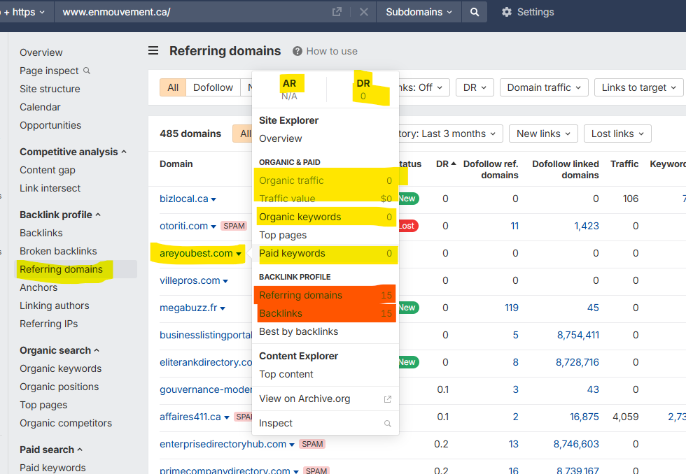
There’s no single-click filter in Ahrefs that labels a referring domain as expired. What you’re looking for are signals that suggest a domain may no longer be active:
- DR drop to zero or near-zero
- No outgoing links or traffic
- A cluster of links all going “lost” around the same period in the Backlinks report
Pro tip: Sort by DR ascending to bring lower-authority referring domains to the top, then work through them manually.
Here’s an example of a suspicious-looking referring domain for www.enmouvement.ca/:
4. Separate Dead Pages From Dead Domains
This is a critical distinction that wastes a lot of time when it gets conflated.
- A dead page is a single URL that no longer resolve, but the domain itself is still live, registered, and owned by someone. There’s nothing to acquire.
- A dead domain means the entire root domain is no longer resolving, so there’s no homepage, no redirects, and no active ownership. This is what you’re looking for.
When you find a referring domain worth investigating, open it directly in your browser. If it resolves to an active site, it’s not available. If it returns a DNS error, a parked page, or a GoDaddy placeholder, it’s a candidate worth taking to the next stage.
5. Export Candidates With Notes for Validation
Once you’ve identified domains that appear dead, export them with the context that matters:
- The competitor they were linking to
- The anchor text used
- The page on your competitor’s site they were linking to
- Any notes on link type (contextual, sitewide, etc.)
That context is what you’ll use in the metrics and verification stages. A domain that linked contextually to a resource page on a competitor’s site is a very different candidate from one that linked via a footer widget even if their referring domain counts look similar in the data.
Run this process across all five to ten competitors before moving to evaluation. The larger your initial candidate pool, the better your shortlist will be after filtering.
Method 2. How to Find Expired Domains Through Broken Link Signals
Broken link signals are one of the cleanest ways to surface expired domain opportunities because they start from a stronger premise than generic domain lists: a real site in your niche once chose to link to a real resource, and that resource no longer works. That does not automatically make the domain valuable, but it gives you a much better starting point than chasing expired names with no editorial context behind them.
1. Identify Authority Sites in Your Niche
Start with sites that curate resources, cite external references, or publish evergreen educational content. Industry associations, university pages, long-running niche websites, professional communities, and nonprofit organizations are especially useful here because they tend to link out selectively and keep content live for years.
When one of their cited resources breaks, it’s usually because the destination disappeared.
2. Pull Their Outbound Broken Links
In Ahrefs, enter one of these authority sites into Site Explorer and navigate to the Broken Links or Outgoing Links reports, depending on how you prefer to work through external dead URLs. What you want are broken outbound links pointing to external resources
Remember: You’re looking for broken competitor links that appear to have once been meaningful enough to cite.
3. Trace the Dead Domain Behind Each Broken URL
Once you find a broken outbound link, look at the full destination URL and isolate the root domain. A broken page on a still-active domain is usually irrelevant for acquisition purposes. The opportunity exists only when the root domain itself is dead, parked, or no longer owned by an active business.
Open the root domain directly in your browser. If the site is still live, move on. If the entire domain is down or parked, add it to your review list.
For example, for Beauty Sense Canada, we found several broken links:
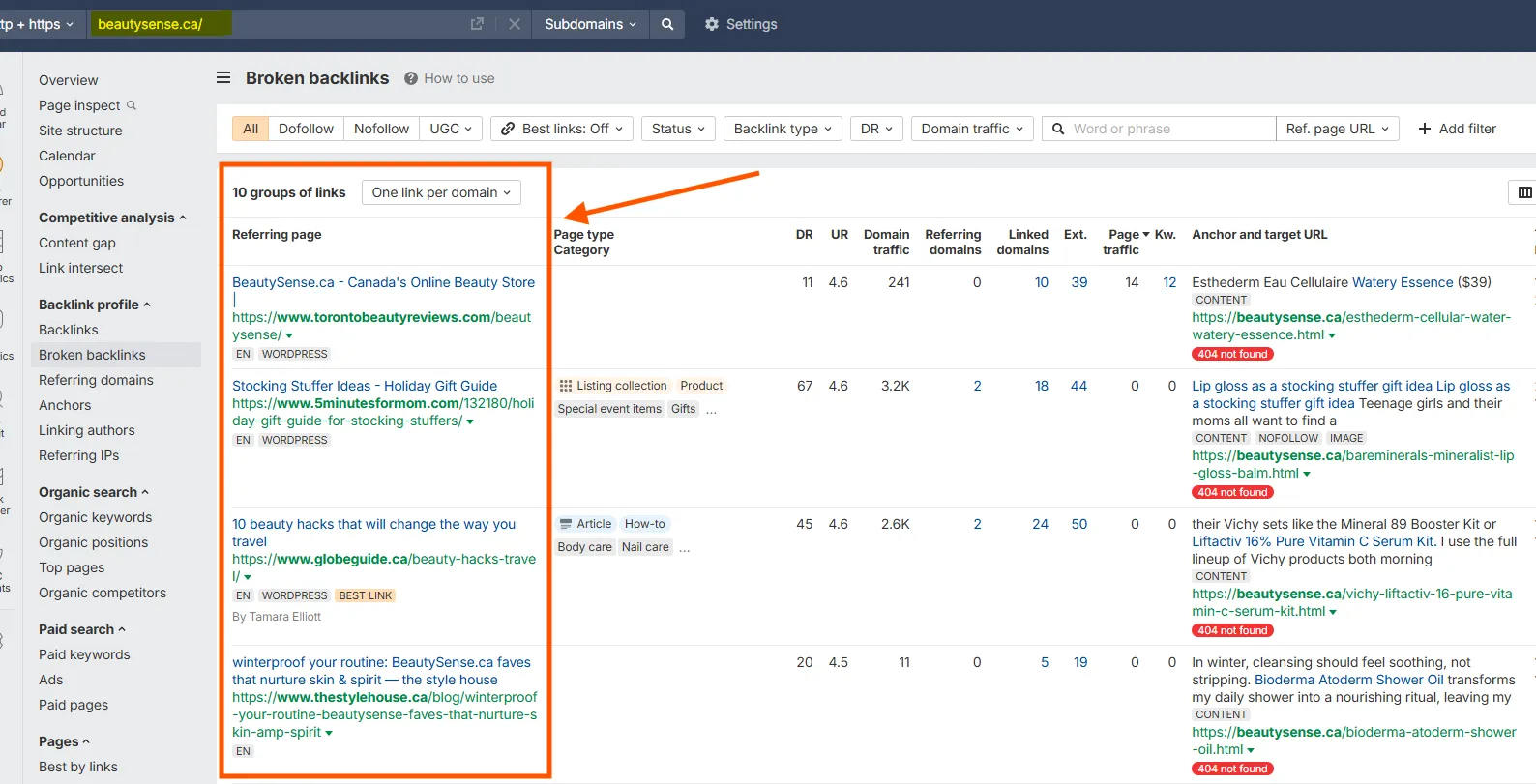
But you have to manually click on each one to verify whether the domain is expired or not.
4. Check Topical Relevance Before Adding to Your Shortlist
This step matters more than people think. A dead resource page about supply chain compliance might have earned a good link from your niche association, but if your intended use is SaaS sales enablement, the overlap is too thin to justify acquisition. One relevant link from the wrong topical ecosystem doesn’t make the domain strategically useful.
Method 3. How to Find Expired Domains Using Ahrefs Content Explorer
Content Explorer is one of the most overlooked workflows for expired domain research because most people use it only for content ideation.
What makes this method different is that relevance comes first. Instead of starting with domain lists and trying to infer fit later, you begin with content tied directly to your niche, then investigate which pieces disappeared and whether the domains behind them are still worth pursuing.
Here’s how to do that:
1. Search a Topic Keyword Inside Content Explorer
Enter a topic closely tied to your intended use case. The more precise the topic, the better the results. A query like “technical SEO migration checklist” will produce more useful candidates than something vague like “SEO.” You want content that lived in your subject area, attracted links, and may no longer be active.
2. Filter for Pages With Referring Domains but No Live Traffic
This combination is interesting because it points to content that earned links in the past but has since disappeared, decayed, or been abandoned.
Here’s how you can set those filters in Content Explorer:
Remember: Zero traffic alone is not enough. After all, plenty of live pages get no traffic. The signal becomes useful when link equity still exists in the data but the page no longer appears active or visible.
3. Check Whether the URL Still Resolves
Open the actual URL:
- Some pages will return a true 404.
- Others will redirect to a homepage, a holding page, or a completely different business.
If the page is gone, strip back to the root domain and check its status. Sometimes you will find an entire site that has disappeared. Other times, the domain is live but repurposed, which usually kills the acquisition angle even if the page itself is gone.
4. Cross-Check in Site Explorer Before Shortlisting
When the root domain looks genuinely inactive, run it through Site Explorer and check:
- Referring domain trends
- Anchor text patterns
- Whether the strongest links point to the vanished page or to the domain more broadly
This final check helps you decide whether the domain behind them deserves a place on your shortlist.
Method 4. How to Find Expired Domains Using Link Intersect
Link Intersect is one of the few workflows that lets you stack relevance signals before you even start evaluating individual domains.
For instance, if a now-dead domain linked to several of your competitors, it was probably operating inside your ecosystem, referencing similar content, and earning enough trust to be cited more than once. That combination is difficult to fake and worth investigating.
Here’s how to find those domains.
1. Enter Three to Five Competitors Into the Link Intersect Tool
Start with the competitor list you defined earlier. Add three to five domains into Link Intersect, keeping the group tight and comparable in scope. Mixing radically different sites weakens the signal because overlap becomes less meaningful.
2. Filter for Domains Linking to Multiple Competitors
Run the report and focus on domains that link to at least three or more of your competitors. One link can be incidental. Two can still be coincidence. Three starts to indicate a pattern of relevance and editorial intent.
Pro tip: Ignore the temptation to sort by DR or total links at this stage. Intersection count is the primary signal.
Here’s how easy it is to set it up:
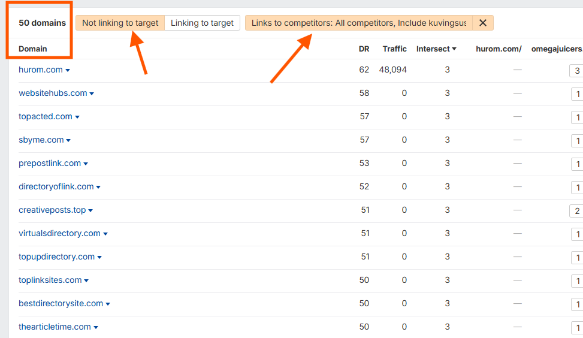
3. Check Whether Those Referring Domains Still Resolve
From the intersecting domains list, open each candidate directly. Many will still be active sites, which makes them irrelevant for acquisition. What you’re looking for are domains that no longer resolve, show parked pages, or appear abandoned.
4. Add Candidates to Your Shortlist With Intersection Count Noted
When you log these domains, include the number of competitors they intersect with. That number becomes a useful weighting factor later when you compare candidates with similar link profiles.
A domain linked by four competitors with a moderate backlink profile can be more strategically valuable than a higher-metric domain linked by only one.
Warning: Not all intersections are meaningful. Generic directories, scraping platforms, and low-quality aggregators link to large numbers of sites across unrelated niches. If the intersecting domain looks like a catch-all listing site, discard it regardless of how many competitors it links to.
Method 5. How to Find Expired Domains Through Lost Backlinks Reports
The Lost Backlinks report gives you a time-based view of link decay, which makes it uniquely useful for spotting domains that disappeared entirely. These domains were actively linking to content in your niche, and then something changed. Your job is to determine whether that change was editorial or structural.
1. Open a Competitor’s Lost Backlinks Report
Start with one of your stronger competitors and navigate to the Lost Backlinks report in Site Explorer. This shows you links that were previously live but are no longer detected.
Remember: You’re interested in patterns here, not necessarily volume.
2. Filter by Lost Date and Link Type
Focus on links lost within a defined timeframe because clusters of lost links around the same period indicate a domain-level event. The others can be simply isolated editorial updates.
Also filter by link type where possible. Contextual links are far more valuable signals than sidebar or footer links, which are frequently removed without deeper meaning.
3. Identify Referring Domains That Have Gone Dark Entirely
For each lost link, check the referring domain directly. If the domain still resolves and appears active, the link was likely removed intentionally, so it has no acquisition value.
If the domain itself no longer resolves, returns errors, or is parked, you may be looking at a true expired domain candidate.
4. Shortlist Dead Referring Domains With Strong Original Context
When you find a dead domain, go back to the original link context. What kind of page was linking out? Was it a guide, a resource list, a citation inside a detailed article? That context tells you why the link existed and whether it was earned through real content value.
Domains that lost multiple contextual links across different competitors are especially strong candidates. They indicate consistent relevance before disappearance.
Another warning: not all lost links signal domain death. Many are removed during content updates, site redesigns, or SEO cleanups. If the domain is still active, even if the page is gone, it does not belong in your acquisition pipeline.
Which Ahrefs Metrics Actually Matter When Evaluating Expired Domains?
Most expired domain mistakes happen at this stage because Ahrefs gives you a lot of signals, but only a few of them reliably separate durable link equity from noise. Let’s review them below.
Referring Domains Trend Over Time
Open the referring domains graph and look at the shape.
- Gradual, uneven growth over time, sometimes flattening but rarely collapsing, points to healthy domains.
- Sharp spikes followed by steep drops usually suggest link building campaigns that were either removed or devalued.
- Flat or declining trends indicate that the domain may have lost relevance before it expired.
Anchor Text Distribution
Anchor text tells you how the domain was positioned in practice. You’re looking for a mix dominated by branded, URL, and natural-language anchors. That pattern suggests links were earned through recognition or citation.
Red flags we typically see are:
- Exact-match commercial anchors dominate, especially across multiple referring domains. That’s a strong manipulation signal, even if the referring domains look clean.
- Foreign-language anchors in an otherwise unrelated niche usually point to spam injections or repurposed domains.
Link Type Mix
Contextual, in-content links from relevant pages are what you want because they indicate editorial intent.
If most links come from directories, footer placements, blogrolls, or sitewide widgets, the profile may look large in Ahrefs but lacks depth.
Remember: One contextual link from a relevant industry site can be more valuable than ten directory listings. Especially more so if you’re interested in LLM SEO.
Top Linked Pages
Navigate to the Best by Links report and review which pages attracted the most links.
- If the strongest links point to pages aligned with your intended use, that’s a good sign.
- If they point to unrelated topics, outdated tools, or thin content, the authority may not transfer cleanly.
This is also where you catch mismatches early. A domain with strong links to “free logo generators” is not a good fit for a B2B SaaS content strategy, regardless of metrics.
Traffic History (If Available)
A domain that had stable traffic before expiration suggests it was indexed, trusted, and functioning normally.
A domain with zero traffic and no history of visibility may never have performed, or it may have been penalized.
How to Score and Shortlist Expired Domains Before Buying
At this point, you should have a list of candidates that passed initial filtering and verification. Now, you need a structured scoring model to make the right choice.
Our Simple Five-Factor Scoring Model for Expired Domains
We advise you to score each domain across five factors:
- Topical relevance: Does the domain’s historical content and link context align with your intended use? This carries the most weight. If relevance is weak, everything else becomes harder to justify.
- Link quality: Are the links contextual, still live, and coming from real sites with editorial standards? Ignore volume. Focus on placement and legitimacy.
- History cleanliness: Did the domain maintain a consistent topic without spam periods, hacks, or multiple pivots?
- Brand risk: Does the name introduce trademark exposure or confusion with an existing brand? This is binary: if any risk exists, the domain is not usable.
- Price vs. actual value: Does the cost reflect what you’re actually getting in terms of usable links and relevance? Expired domains can be overpriced relative to their real utility.
Use a simple scale (for example, 1 to 5 per factor) and total the score. The exact numbers matter less than applying the same lens to every candidate.
How to Use Our Scoring Framework
Once scored, group domains into three tiers:
- Immediate candidates: High scores across all five factors. These are worth acting on quickly before availability changes.
- Watch list: Strong in some areas but with tradeoffs. Price too high, relevance slightly off, or link quality mixed. These are worth revisiting if conditions change.
- Discard: Fails on one or more core factors. Keeping these in your pipeline only creates noise and slows decision-making.
How to Buy Expired Domains (With Traffic)
Buying expired domains means buying an asset, so availability, acquisition method, and verification all matter.
Start by identifying where the domain sits in its lifecycle:
- Dropped domains: These are available to register at normal cost (fast, competitive).
- Pending delete: They’re about to drop, so they’re usually targeted by drop-catching services.
- Auctions / closeouts: These are listed on platforms like GoDaddy or Sedo, with more time to evaluate.
Once you find a candidate, confirm availability through a registrar, not Ahrefs. Then decide how to acquire it:
- Use a drop-catching service if it hasn’t been released yet.
- Bid directly if it’s in auction.
- Register immediately if it’s fully dropped.
If you’re targeting expired domains with traffic, verify that traffic is recent and consistent. Check whether pages still rank or if visibility has already collapsed.
Before purchasing, confirm:
- The domain isn’t still renewable by the original owner.
- The strongest backlinks are still live.
- There are no trademark risks.
Finally, set a price ceiling based on actual link quality and relevance. Most expired domains are overpriced relative to what they deliver, so discipline here matters more than speed. That discipline is hardest to hold when you are bidding in a domain auction against buyers who set no ceiling at all.
After You Buy: The Safest Ways to Deploy an Expired Domain
Acquisition is only half the decision. Deployment determines whether the value you identified actually translates into usable authority or disappears. Here’s what you can do:
- Rebuild the original site on its original topic: This is the lowest-risk path. If the domain had a clear topic and earned links around that topic, rebuilding a version of the original site preserves alignment between past signals and current intent.
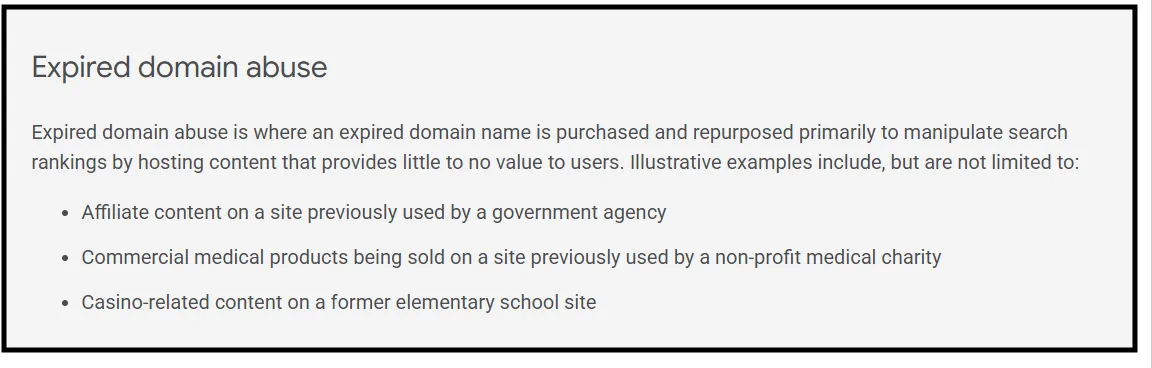
- Launch a new site with clearly aligned intent: This is where many people stretch too far. A domain previously focused on cybersecurity tools can support a broader “enterprise IT” angle. It cannot credibly pivot into eCommerce marketing or fitness. Google defines this as “expired domain abuse” and penalizes you for it. In their own words:
- Use selective redirects with clear rationale: Instead of redirecting the entire domain to a homepage, map specific legacy URLs to equivalent or closely related pages on your target site. If an old page earned links for “API security best practices,” it should redirect to a page that genuinely covers that topic.
Conclusion
Ahrefs helps you eliminate bad domains faster, but quality comes from process. The domains that work are the ones with clean history, strong topical alignment, and links that still make sense.
If you want this done without the trial-and-error, Bluethings handles sourcing, validation, and deployment using the same process outlined here, so you only invest in domains that actually hold value.
Want to acquire an expired domain that actually helps your SEO gameplan? Get in touch today and we’ll do that for you!
FAQs
How do I check if a domain has actually expired?
Use a registrar or WHOIS lookup to confirm availability. Ahrefs shows link data only, so always verify whether the domain is registered, pending delete, or publicly available. This step matters because expired domains can still show strong metrics in tools while having zero real presence in Search Engine Results Pages, which is often the first sign that their residual SEO value is gone.
Which Ahrefs reports are most useful for finding expired domains?
Referring Domains, Broken Links, Content Explorer, Link Intersect, and Lost Backlinks reports. Each surfaces candidates differently, but all require manual validation to confirm domain status and quality. For example, some domains may look strong due to links from questionable backlink providers, which can inflate metrics without contributing to real search engine trust.
What’s a realistic DR minimum for an expired domain to be worth buying?
There is no strict minimum. DR helps filter options, but relevance, link quality, and clean history matter more than any specific threshold. A lower-DR domain with natural links and consistent indexing can outperform a higher-DR domain built on link manipulation.
Can I use an expired domain in a different niche than its original one?
Only if the topics are closely related. Major shifts break link relevance and reduce value. In most cases, staying aligned with the original niche is safer.
Why do some expired domains cost thousands while similar ones are cheap?
Price reflects perceived demand, backlink profiles, and marketplace competition. Some domains are overpriced due to inflated metrics, while others are undervalued because their quality isn’t obvious at first glance.
How long after buying should I wait before building on an expired domain?
There’s no fixed delay. Build once you’ve fully verified history, mapped key URLs, and decided on deployment. Rushing without that clarity risks losing value.
What’s the difference between a dropped domain and one at auction?
Dropped domains are fully released and available to register. Auction domains are sold through platforms before release, usually at higher prices but with more time to evaluate.